
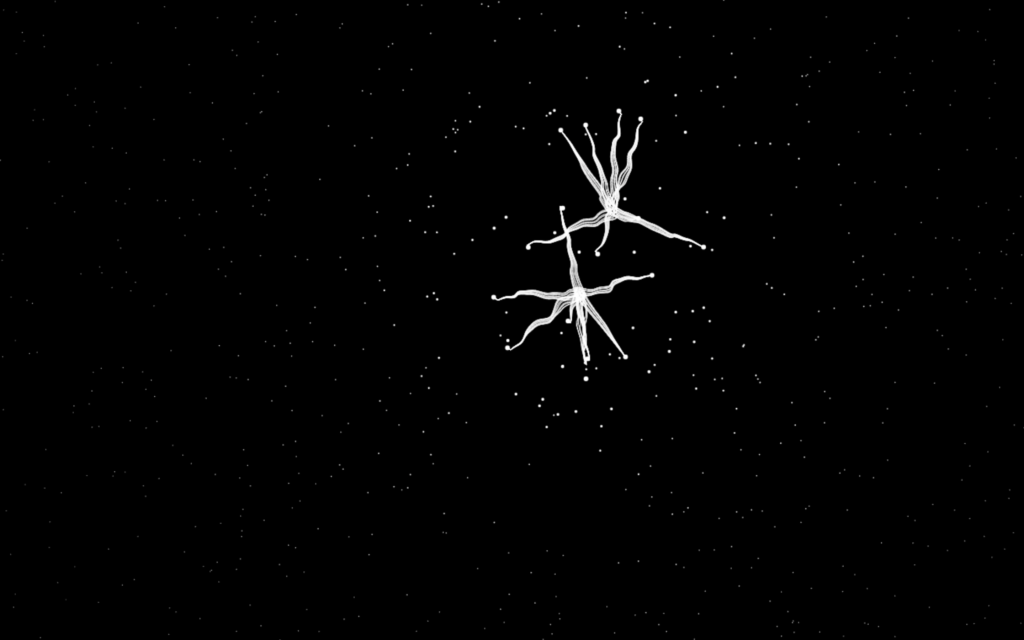
Building a creepy spider cursor animation using HTML, CSS, and JavaScript. Sometimes the most fun web projects are the ones that don’t have a strict purpose. They exist simply to surprise people, make them smile, or add a little personality to a page. One such experiment is a Spider Cursor Animation a creepy-cute spider that follows your mouse around the screen in real time.
In this post, we’ll build a playful also creepy spider cursor animation using plain HTML, CSS, and JavaScript. No frameworks, no libraries just the raw power of the browser. As your cursor moves, the spider reacts and walks toward it with smooth, organic motion. It’s spooky, interactive, and surprisingly satisfying to watch.
We’ll use HTML to define the basic structure of the page and set up a canvas element. CSS will keep things clean and full screen, and JavaScript will handle all the magic tracking mouse movement, animating the spider, and drawing everything frame by frame.
This kind of project is perfect if you want to experiment with cursor-based animations or understand how motion and interaction work on the web. Beginners will learn a lot about canvas rendering and event handling, while experienced developers can enjoy tweaking the math and movement to create even cooler effects. Let’s bring this spider to life 🕷️✨
HTML for Creepy Spider Cursor Animation
The HTML file sets up a simple webpage and prepares the canvas where the animation will be drawn. We define the document structure, include a title, and link our external CSS and JavaScript files. The <canvas> element acts as the drawing surface for the spider animation.
<!DOCTYPE html>
<html lang="en">
<head>
  <meta charset="UTF-8">
  <title>Spider Cursor Animation</title>
  <link rel="stylesheet" href="./style.css">
</head>
<body>
  <canvas id="canvas"></canvas>
  <script src="./script.js"></script>
</body>
</html>
CSS for Creepy Spider Cursor Animation
The CSS is intentionally minimal. We remove the default margin and prevent scrolling so the animation always fills the entire screen without interruptions. This keeps the experience immersive and distraction-free.
body {
    overflow: hidden;
    margin: 0;
}
JavaScript for Cursor Animation
This is where the real fun happens. The JavaScript creates multiple spider objects made up of points and legs. Each spider smoothly follows the mouse cursor while adding small, natural movements using sine and cosine functions. The result is an organic walking motion that feels alive rather than robotic.
On every animation frame, the canvas is cleared, the spider’s position is updated, and its body and legs are redrawn with subtle noise to create a wiggly, realistic effect. The animation reacts instantly to pointer movement, making it feel responsive and interactive.
let w, h;
const ctx = canvas.getContext("2d");
const { sin, cos, PI, hypot, min, max } = Math;


function spawn() {

    const pts = many(333, () => {
        return {
            x: rnd(innerWidth),
            y: rnd(innerHeight),
            len: 0,
            r: 0
        };
    });

    const pts2 = many(9, (i) => {
        return {
            x: cos((i / 9) * PI * 2),
            y: sin((i / 9) * PI * 2)
        };
    });

    let seed = rnd(100)
    let tx = rnd(innerWidth);
    let ty = rnd(innerHeight);
    let x = rnd(innerWidth)
    let y = rnd(innerHeight)
    let kx = rnd(0.5, 0.5)
    let ky = rnd(0.5, 0.5)
    let walkRadius = pt(rnd(50, 50), rnd(50, 50))
    let r = innerWidth / rnd(100, 150);

    function paintPt(pt) {
        pts2.forEach((pt2) => {
            if (!pt.len)
                return
            drawLine(
                lerp(x + pt2.x * r, pt.x, pt.len * pt.len),
                lerp(y + pt2.y * r, pt.y, pt.len * pt.len),
                x + pt2.x * r,
                y + pt2.y * r
            );
        });
        drawCircle(pt.x, pt.y, pt.r);
    }

    return {
        follow(x, y) {
            tx = x;
            ty = y;
        },

        tick(t) {

            const selfMoveX = cos(t * kx + seed) * walkRadius.x
            const selfMoveY = sin(t * ky + seed) * walkRadius.y
            let fx = tx + selfMoveX;
            let fy = ty + selfMoveY;

            x += min(innerWidth / 100, (fx - x) / 10)
            y += min(innerWidth / 100, (fy - y) / 10)

            let i = 0
            pts.forEach((pt) => {
                const dx = pt.x - x,
                    dy = pt.y - y;
                const len = hypot(dx, dy);
                let r = min(2, innerWidth / len / 5);
                pt.t = 0;
                const increasing = len < innerWidth / 10
                    && (i++) < 8;
                let dir = increasing ? 0.1 : -0.1;
                if (increasing) {
                    r *= 1.5;
                }
                pt.r = r;
                pt.len = max(0, min(pt.len + dir, 1));
                paintPt(pt)
            });


        }
    }
}

const spiders = many(2, spawn)

addEventListener("pointermove", (e) => {
    spiders.forEach(spider => {
        spider.follow(e.clientX, e.clientY)
    })
});

requestAnimationFrame(function anim(t) {
    if (w !== innerWidth) w = canvas.width = innerWidth;
    if (h !== innerHeight) h = canvas.height = innerHeight;
    ctx.fillStyle = "#000";
    drawCircle(0, 0, w * 10);
    ctx.fillStyle = ctx.strokeStyle = "#fff";
    t /= 1000
    spiders.forEach(spider => spider.tick(t))
    requestAnimationFrame(anim);
});

function recalc(X, Y) {
    tx = X;
    ty = Y;
}

function rnd(x = 1, dx = 0) {
    return Math.random() * x + dx;
}

function drawCircle(x, y, r, color) {
    //console.log(x,y,r)
    // ctx.fillStyle = color;
    ctx.beginPath();
    ctx.ellipse(x, y, r, r, 0, 0, PI * 2);
    ctx.fill();
}

function drawLine(x0, y0, x1, y1) {
    ctx.beginPath();
    ctx.moveTo(x0, y0);

    many(100, (i) => {
        i = (i + 1) / 100;
        let x = lerp(x0, x1, i);
        let y = lerp(y0, y1, i);
        let k = noise(x / 5 + x0, y / 5 + y0) * 2;
        ctx.lineTo(x + k, y + k);
    });

    ctx.stroke();
}

function many(n, f) {
    return [...Array(n)].map((_, i) => f(i));
}

function lerp(a, b, t) {
    return a + (b - a) * t;
}

function noise(x, y, t = 101) {
    let w0 = sin(0.3 * x + 1.4 * t + 2.0 +
        2.5 * sin(0.4 * y + -1.3 * t + 1.0));
    let w1 = sin(0.2 * y + 1.5 * t + 2.8 +
        2.3 * sin(0.5 * x + -1.2 * t + 0.5));
    return w0 + w1;
}

function pt(x, y) {
    return { x, y }
}
In conclusion, building a Spider Cursor Animation with HTML, CSS, and JavaScript is a fantastic way to explore interactive effects on the web. By combining mouse tracking with smooth, math-based animation, you can create an experience that instantly grabs attention and feels alive 🕸️💻
If something doesn’t work on the first try, don’t stress animation projects often need a little tweaking. Play around with the values, experiment with movement speed, or add your own creative twists. Download the source code, break it, fix it, and most importantly, have fun coding.