
What is e-Aadhaar Card
e-Aadhaar card is a digital copy of your physical Aadhaar card which is issued by UIDAI (Unique Identification Authority of India) You can use it like a normal Aadhaar as it is as important as a physical Aadhaar card, It is password protected and digitally signed by UIDAI, e-Aadhaar card carries all the details which are present in your physical Aadhaar card like 12 digit Aadhaar number, your full name, your address, your date of birth, your gender, your photograph.
Talking about its password format, it is (First four letters of your name (in CAPITAL) + Year of Birth).
How to Download e-Aadhaar Card
Follow the following steps to download your Aadhaar card:
First, visit myaadhaar.uidai.gov.in
Then scroll down and select Download Aadhaar.
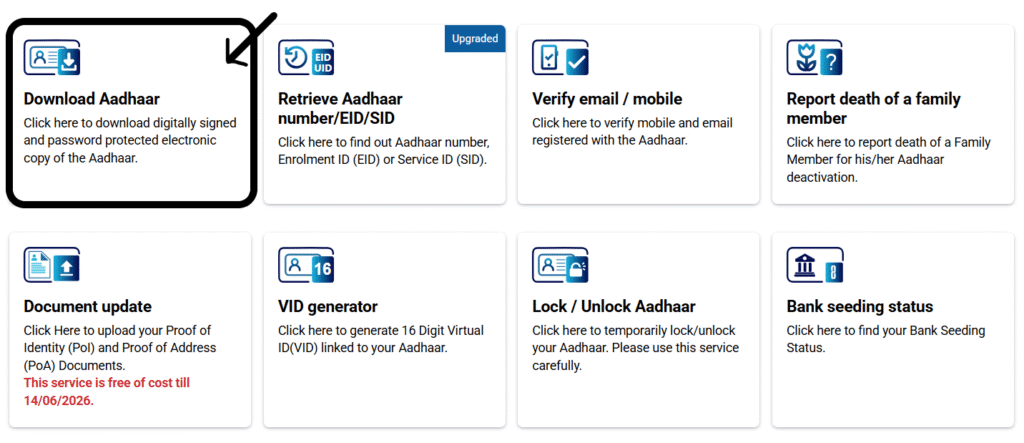
Selecting this will redirect you to a new page, as you can see below.
On this page, you will find four options for downloading your Aadhaar:
- Using your Aadhaar number
- Using your Enrolment ID number
- Using your Virtual ID number
- Using your SID
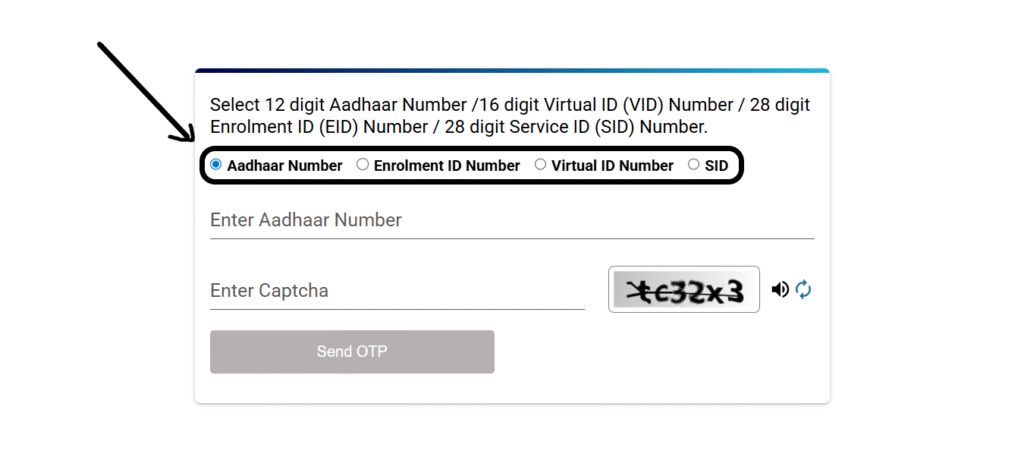
Let’s learn how to download using your Aadhaar number.
- First, you must enter your 12-digit Aadhaar number.
- Then enter the captcha.
- Click the Send OTP button.
- After that, you must select your Aadhaar type for privacy, either regular Aadhaar or masked Aadhaar.
- Enter the OTP received and click Verify and Download.
- Your e-Aadhaar card will be downloaded to your device.
- This downloaded Aadhaar card remains locked, and you must enter a password to unlock it.
- The password is the first four letters of your name and your birth year.
Please attach the website link also…👍👍